Export
SWISSLOG allows you to export data from nearly all windows containing data.
Export is always called with a pop-up or the Function menu. So if you want to
export data press the right mouse button or select Functions from the main
menu and look for the Export menu entry.
Export Formats supported by SWISSLOG
SWISSLOG supports exporting to the following file formats:
- ADIF - Amateur Interchange Format. This is a widely used format and
allows the data exchange between many log programs
- HTML
- Microsoft Word
- Microsoft Excel
- Text
- Rich Text
- Comma-Delimited Text (CSV)
- Tab-Delimited Text
- Data Interchange Format (DIF)
- SYLK Format
- Clipboard
- DOS Version of SWISSLOG
The Export Function
As already mentioned, the Export Function is available in most windows in
which data records are displayed. You can export Logbook views, Statistics and
DX Spots.
SWISSLOG always exports the fields which are visible in the window. So to
control the fields you want to export you have to add or delete fields in the
view.
When you select the Export function, the following dialog is displayed:
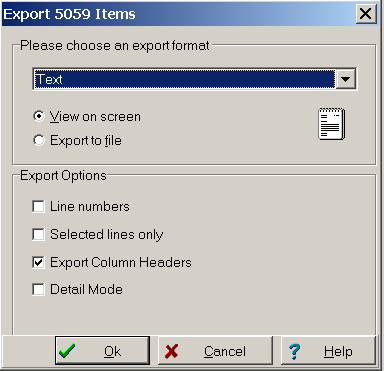
- In the drop down list at the top you can select the format in which you
want to export.
- You can either display the result of the export on the screen or store it
in a file. Select the corresponding radio button.
- The Export Options allows you to control the export in more detail:
- Line Numbers: adds the line number as first field in the
exported data
- Selected Lines only: only the records selected in the
view are exported
- Export Column Header: exports the name of the columns as first
record
- Detail Mode: export each column on a separate line with the
column header in front. This works only for some export types.
- If you export into HTML Format and additional set of Options are
displayed:
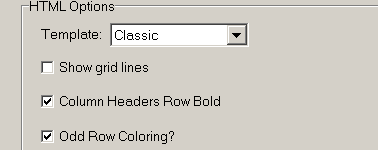
- Template allows you select one of the color schemes
- Show grid lines controls if gridlines are displayed or not
- Column Headers Row Bold : if set the headers are displayed
in bold
- Odd Row Coloring: if set the rows are colored alternately.
Copyright © 2004 SWISSLOG
Last modified: 01 Jan 2005